

In my wrap-up post of January I mentioned that I would do a post about keeping a database in Notion. Now wait wait wait, don’t walk away … I think for some of you the hair is standing back of your neck and you are frowning. The word ‘database’ perhaps looks creepy, nerdy and will be for many uncharted or even unwanted territory. Don’t worry, just keep reading on for 5 minutes and you will understand…I promise!
You can jump straight ahead to following tables:
For many years I was an accountant in a transporting company. Because of my great interest in IT, more specifically Excel and Access, I eventually ended up completely in the IT world. I managed data and designed software to access that data. In this post I’m certainly not going into the technical route, so for the IT readers among us, keep this in mind.
Without really thinking about it, we use data from databases on a daily basis. We keep our own data or we request data. All the information we look for on the internet comes from a database and is managed in one way or another. Thousands of books have probably been written about data management because it is so complicated and because there are so many different ways.
Why do I want to bother you with this in a blog about fountain pens and sketches? As a fountain pen collector I once started to manually build up a list of the fountain pens I have. But because this is so cumbersome to write everything down and because it takes so much time to look something up, I quickly switched to a better way: a database.

The most obvious is of course Excel. Now, what I actually wanted to do, would work perfectly well in Microsoft Excel or Access, but it’s quite complicated. So I started looking for some alternatives and eventually ended up at Notion. To be clear, this post and myself are not sponsored, in any way, by Notion. The nice thing about Notion is that it is free to a certain extent and that almost all functions are available. I have been using it for several years and it’s still…free 🙂 Notion is accessible web-based, as an app on your PC or mobile phone/tablet. All data is synchronized and is therefore always accessible.

Within Notion you create workspaces of data that even give you the option to share with others. To get to the point, why do I use Notion? I keep track of personal data, goals, data about my (fountain) pens, ink, financial information, household information, movie lists, work-related information, cooking… The domains to which you can apply it are actually endless. As a fountain pen collector I am often asked how do I keep track of everything? As a pure fountain pen enthusiast, it is almost a must to jot down handwritten information in notebooks. But there is more than that, and that’s where Notion comes into play.
Pen collection table
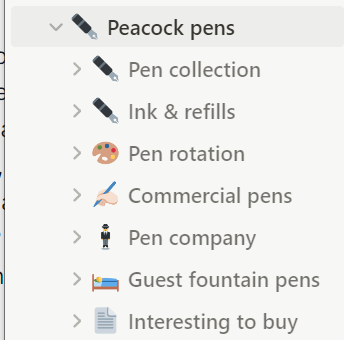
A database is actually a collection of tables. The tables are designed to contain data in which you can keep al the information necessary. The datatables I have are: Pen collection, Ink & Refills, Pen rotation (inked pens), Commercial pens (free advertising pens I got for free or were given to me), Pen company (brands), Guest fountain pens (pens I keep from others) and interesting to buy (actually my wish list).
As an example for my fountain pens, I have a ‘Pen Collection’ table that looks like this:

In the table above you can see what information I keep about my pens, among other things. Each fountain pen is linked to a manufacturer (brand). So actually I also have a table of manufacturers that is linked to the fountain pens. For each pen I keep 35 properties (ID, Brand, Type, Date in, Price, Colour, type ink system, categorie, Shop, …), see below a form of how you insert data:

I have a general view sorted on brand name. You can use any way of sorting your data or apply a filter. When I want only to view my fountain pens, I use a filter and set the Cat. to ‘FP’ (fountain pen). You can create as many views as you want. A view is a representation of your data on which a filter or sorting is applied. I have following views:

- To be reviewed: a list of fountain pens that are untouched and for which I need to do a review.
- General: just a general overview of all my pens (fountain pens, ballpoint pens, glass pens …)
- Pen reviews: a view of all my pens that have been reviewed.
- Grail pens map: I have a map of 12 pens that keep my grail pens. So actually the best reviewed pens I have, are stored here. Pens that do not apply anymore are kept in other sleeves.
- Goldies: a list of all fountain pens with golden nib
- Grail pens box: same as the Grail pens map, but some are also kept in a wooden box.
- …

You see, you can create whatever view you want. You can change a view immediately or delete it. Because the data is kept in a general database, you never lose data. It is also nice that you can add up (sum) information that includes numbers. I keep track of the amount of each pen I have purchased, so it is easy to always know eg. a total of what I have spent. I can do this per brand, per time period, per category of pen, … endless possibilities.
Ink & refills table
Another interesting datatable I keep, is the table that keeps the information about all my ink and refills. This is information about ink bottles, ink cartridges en refills for ballpoint pens.

For this table is have following views: Bottles, Cartridges and Refills.

The view of my ink bottles looks like this:

You can see that I have 42 bottles of ink for which I spent 576,95 Euro.
Pen rotation table
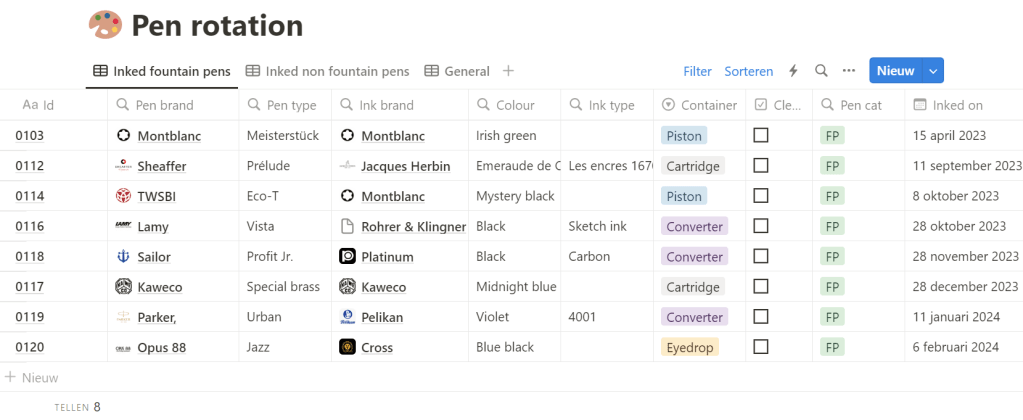
Now the fun things start when you combine tables. I have a table of fountain pens and a table of ink, so when I combine them into a new table, I can keep track of all my inked fountain pens and pens with a refill. I call this new table ‘Pen rotation’. This table looks like this:

You can see that eg. my Opus 88 Jazz fountain pen was inked on 6/2/2024 with Cross blue black ink. When the pen is cleaned, I check the checkbox ‘Cleaned’ and add the date of cleaning. By doing this I can keep track of all my inked fountain pens and their history. I can create interesting lists to see how long I keep my pens inked, what ink I used mostly, … Below you see my current list of inked fountain pen, this is just a view based on my Ink & refills table:
Duplicate data
One important thing you have to keep in mind is: avoid duplicate data. It’s waste of time, energy and it produces overhead costs (harddisk capacity, backup capacity, data searching time …). I give you an example. I keep information about the Brands, such as when the brand was founded, the address, CEO, … This information is just about the brand. My fountain pens are connected with a brand, so it’s not necessary to repeat this information for each pen I have in my pen collection table. This seems to be obvious, and it is, but sometimes when I analyse databases, often duplicate information is found. And I agree, for small databases it is perhaps not the end of the world, but imagine what duplicate data in databases could do for big companies,… and aren’t we always complaining that our PC is slow 😉
Conclusion
Perhaps for some of you the way of keeping data as I do is not an issue or perhaps it is a far-from-my-bed show. I just wanted to inform you that there are good options for managing data in a simple and accessible way, for any application. My notion database has helped me many times and is of immense support to me. Notion is almost plug and play, you could even use templates. I have also spent a long time building my database, and from time to time I still make minor adjustments.
If you would consider trying this, I can advise you to start small. Take it step by step and only keep track of the data that you think is useful. Ask yourself the question: ‘Which lists would I really want?’ and use that as a basis to get started. You can still expand at a later stage.
For purely technical questions about Notion, I would like to refer to their support. If you have any other comments or questions, please feel free to ask, I will be happy to help you. Good luck!
Do you think that keeping a database is something for you? Or do you rather stick to writing information into different notebooks? Or do you have other alternatives? Please comment below.


 Peacock pens
Leave a reply to Wrap up February ’24 – Peacock pens Cancel reply